Global objects are one of the core abstractions in Wayland. They are used to announce supported protocols or announce semi-transient objects, for example available outputs. The compositor can add and remove global objects on the fly. For example, an output global object can be created when a new monitor becomes available, and be removed when the corresponding monitor gets disconnected.
While there are no issues with announcing new global objects, the global removal is a racy process and if things go bad, your application will crash. Application crashes due to output removal were and still are fairly common, unfortunately.
The race
Let’s start from the start. If the compositor detects a new output, it may announce the corresponding wl_output global object. A client interested in outputs will then eventually bind it and receive the information about the output, e.g. the name, geometry, and so on:
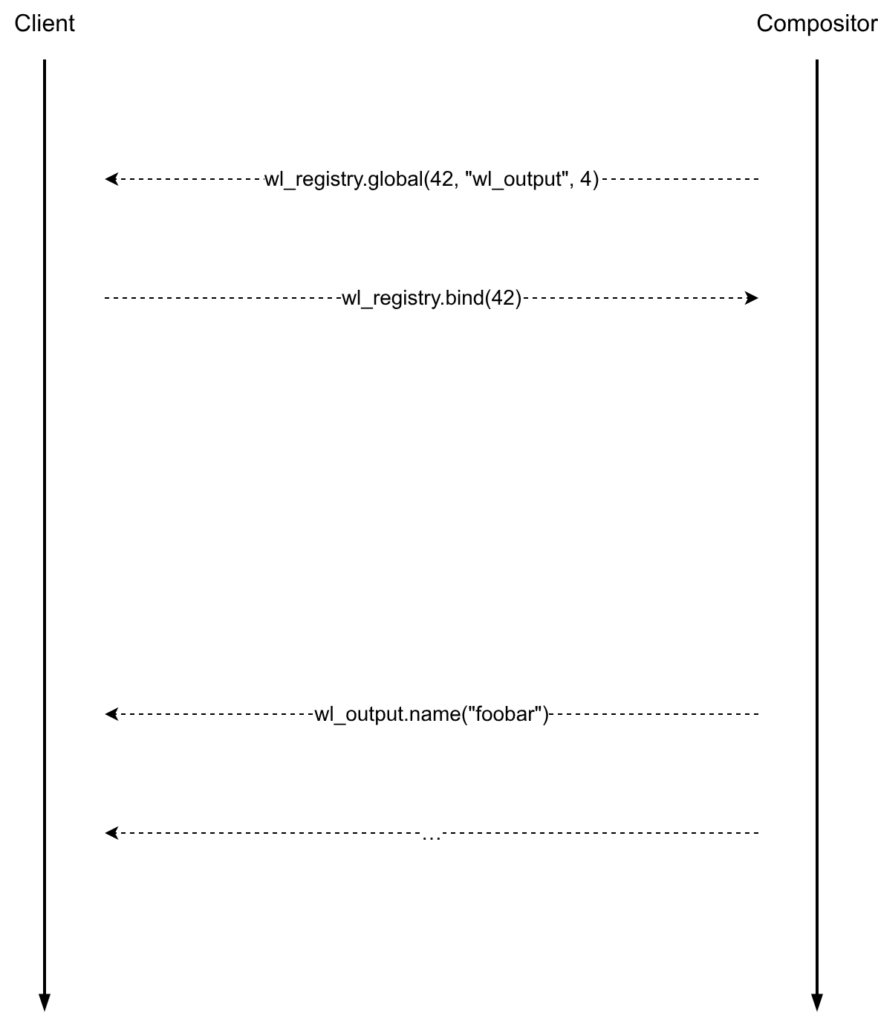
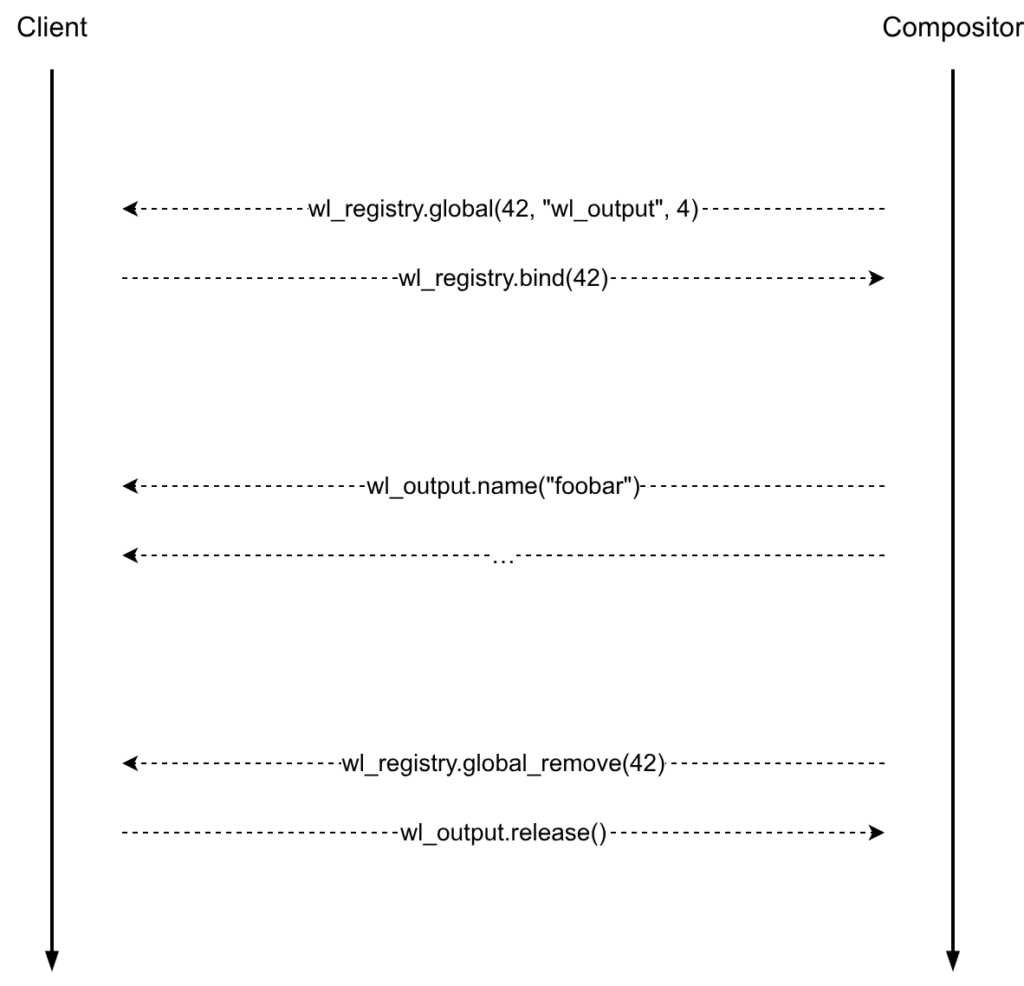
wl_output announcement.Things get interesting when it is time to remove the wl_output global. Ideally, after telling clients that the given global has been removed, nobody should use or bind it. If a client has bound the wl_output global object, it should only perform cleanup.
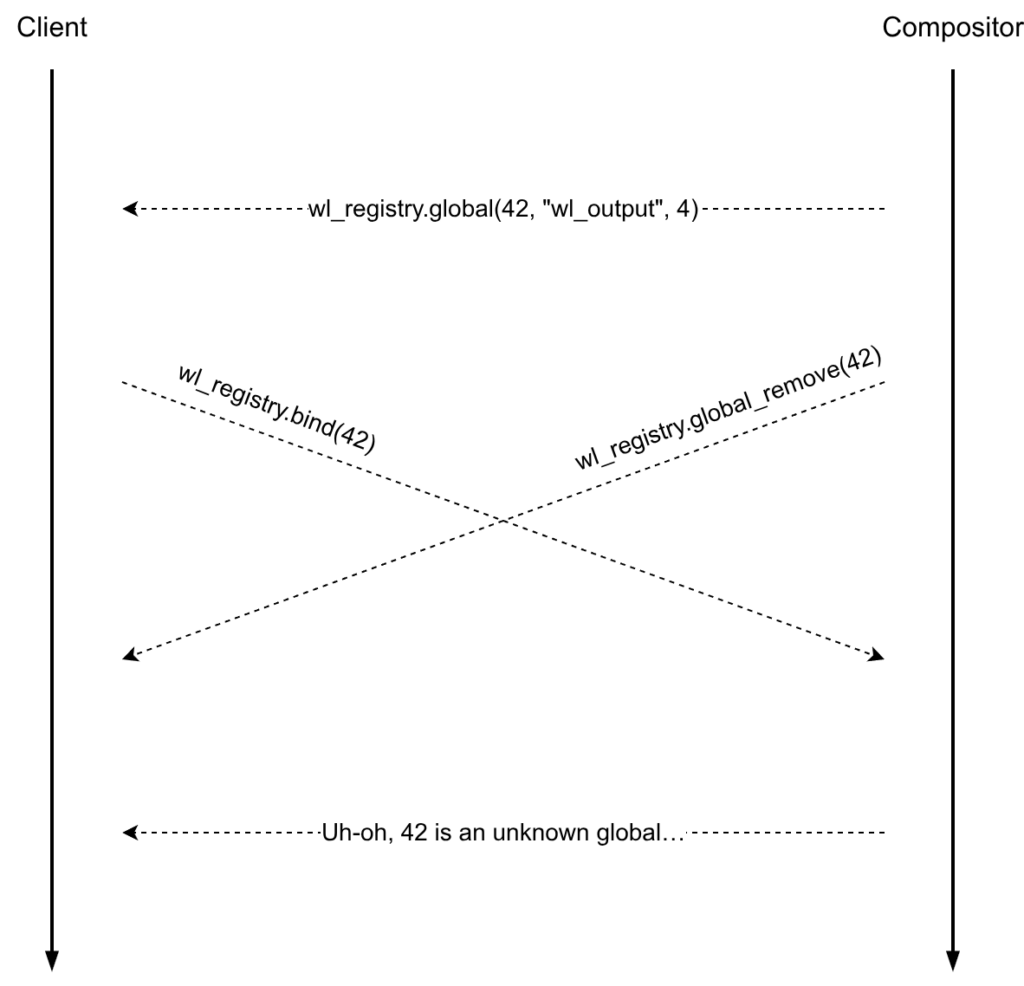
wl_output global removal.However, it can happen that a wl_output global is removed shortly after it has been announced. If a client attempts to bind that wl_output at the same time, there is a big problem now. When the bind request finally arrives at the compositor side, the global won’t exist anymore and the only option left will be to post a protocol error and effectively crash the client.
wl_output global removal race.Attempt #1
Unfortunately, there is not a lot that can be done about the in-flight bind requests, they have to be handled. If we could only tell the clients that a given global has been removed but not destroy it yet, that would help with the race, we would still be able to process bind requests. Once the compositor knows that nobody will bind the global anymore, only then it can destroy it for good. This is the idea behind the first attempt to fix the race.
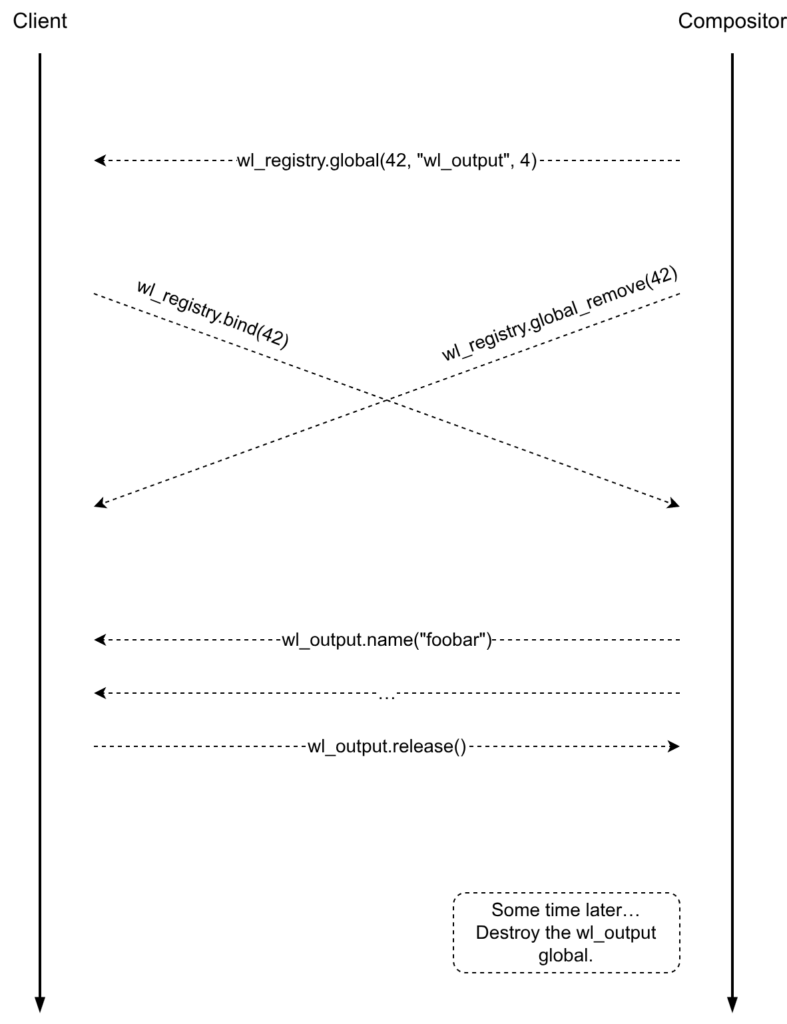
The hardest part is figuring out when a global can be actually destroyed. The best option would be if the clients acknowledged the global removal. After the compositor receives acks from all clients, it can finally destroy the global. But here’s the problem, the wl_registry is frozen, no new requests or events can be added to it. So, as a way around, practically all compositors chose to destroy removed global objects on a timer.
That did help with the race, we saw a reduction in the number of crashes, but they didn’t go away completely… On Linux, the monotonic clock can advance while the computer sleeps. After the computer wakes up from sleep, the global destruction timer will likely time out and the global will be destroyed. This is a huge issue. There can still be clients that saw the global and want to bind it but they were not able to flush their requests on time because the computer went to sleep, etc. So we are kind of back to square one.
Attempt #2
The general idea behind the first attempt was sound, the compositor only needs to know the right time when it is okay to finally destroy the global. It’s absolutely crucial that the Wayland clients can acknowledge the global object removal. But what about the wl_registry interface being frozen? Well, it’s still true, however we’ve got a new way around — the wl_fixes interface. The wl_fixes interface was added to work around the fact that the wl_registry interface is frozen.
With the updated plan, the only slight change in the protocol is that the client needs to send an ack request to the compositor after receiving a wl_registry.global_remove event
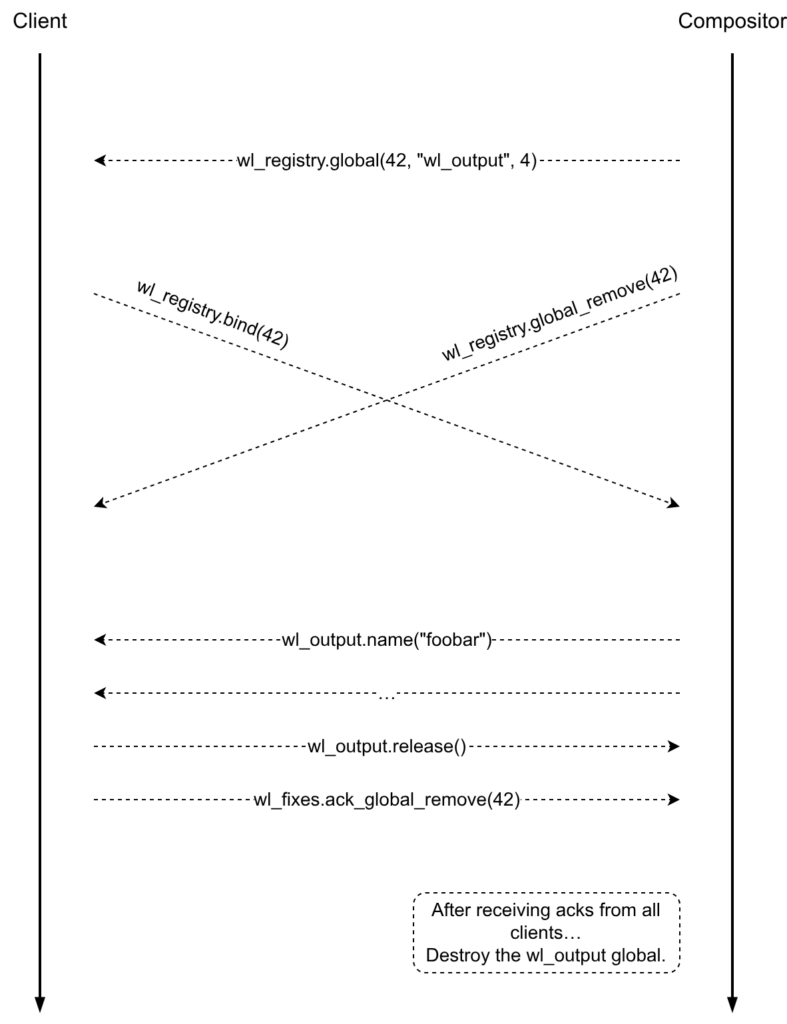
After the compositor receives acks from all clients, it can finally safely destroy the global.
Note that according to this, a client must acknowledge all wl_registry.global_remove events even if it didn’t bind the corresponding global objects. Unfortunately, it also means that all clients must be well-behaving so the compositor can clean up the global data without accidentally getting any client disconnected. If a single client doesn’t ack global remove events, the compositor can start accumulating zombie globals.
Client changes
The client side changes should be fairly trivial. The only thing that a client must do is call the wl_fixes.ack_global_remove request when it receives a wl_registry.global_remove event, that’s it.
Here are some patches to add support for wl_fixes.ack_global_remove in various clients and toolkits:
- Qt: https://codereview.qt-project.org/c/qt/qtbase/+/721655
- GTK3: https://gitlab.gnome.org/GNOME/gtk/-/merge_requests/9649
- GTK4: https://gitlab.gnome.org/GNOME/gtk/-/merge_requests/9648
- SDL: https://github.com/libsdl-org/SDL/pull/15203
- Xwayland: https://gitlab.freedesktop.org/xorg/xserver/-/merge_requests/2140
- Mesa: https://gitlab.freedesktop.org/mesa/mesa/-/merge_requests/40416
- Chromium: https://chromium-review.googlesource.com/c/chromium/src/+/7666143
- Firefox: https://phabricator.services.mozilla.com/D288357
- wayland-rs: https://github.com/Smithay/wayland-rs/pull/887
Compositor changes
libwayland-server gained a few helpers to assist with the removal of global objects. The compositor will need to implement the wl_fixes.ack_global_remove request by calling the wl_fixes_handle_ack_global_remove() function (it is provided by libwayland-server).
In order to remove a global, the compositor will need to set a “withdrawn” callback and then call the wl_global_remove() function. libwayland-server will take care of all other heavy-lifting; it will call the withdrawn callback to notify the compositor when it is safe to call the wl_global_destroy() function.
Conclusion
In hindsight, perhaps available outputs could have been announced differently, not as global objects. That being said, the wl_output did expose some flaws in the core Wayland protocol, which unfortunately, were not trivial and led to various client crashes. With the work described in this post, I hope that the Wayland session will become even more reliable and fewer applications will unexpectedly crash.
Many thanks to Julian Orth and Pekka Paalanen for suggesting ideas and code review!