Improving Xwayland window resizing

One of the quickest ways to determine whether particular application runs using Xwayland is to resize one of its windows and see how it behaves, for example

While it can be handy for the debugging purposes, overall, it makes the Plasma Wayland session look less polished. So, one of the goals for 6.3 was to fix this visual glitch.

This article will provide some background behind what caused the glitch and how we addressed it. Just in case, here’s the same application, which was shown in a screen cast above, but with the corresponding resizing fixes in:

X11 frame synchronization protocol(s)

On X11, all window changes typically take place immediately, including resizing. This can lead to some issues. For example, if a window is resized, it can take a while until the application repaints the window with the new size. What if the compositing manager decides to compose the screen in meanwhile? You’re likely going to see some sort of visual glitches, e.g. the window contents getting cropped or seeing parts of the window that have not been repainted yet.

In order to address this issue, there exists an X11 protocol to synchronize window repaints during interactive resize. An application/client wishing to participate in this protocol needs to list _NET_WM_SYNC_REQUEST in the WM_PROTOCOLS property of the client window and also set the XID of the XSync counter in the _NET_WM_SYNC_REQUEST_COUNTER property. When the WM wants to resize the window, the following will happen:

  1. The window manager sends a _NET_WM_SYNC_REQUEST client message containing a serial that the client will need to put in the XSync counter after processing a ConfigureNotify event that will be generated after the window is resized. The compositing manager and the window manager will block window updates until the XSync request acknowledgement is received;
  2. The WM resizes the client window, for example by calling the xcb_configure_window() function;
  3. The client would then repaint the window with the new size and update the XSync counter with the serial that it had received in step 1;
  4. The window manager and the compositing manager unblock window updates after receiving receiving the XSync request acknowledgement. For example, now, the window can be repainted by the compositing manager and there shouldn’t be glitches as long as the client behaves well.

Note that the window manager and the compositing manager are often the same. For example, both KWin and Mutter are compositing managers and window managers.

The frame synchronization protocol described above is called basic frame synchronization protocol. There is also an extended frame synchronization protocol, but it is not standardized and it is implemented only by a few compositing managers.

_NET_WM_SYNC_REQUEST and Xwayland

KWin supports the basic frame synchronization protocol, so there should be no visual glitches when resizing X11 windows in the Plasma Wayland session, right? At quick glance, yes, but we forget about the most important detail: Wayland compositors don’t use XCompositeNameWindowPixmap() or xcb_composite_name_window_pixmap() to grab the contents of X11 windows, instead they rely on Xwayland attaching graphics buffers to wl_surface objects, so there is no strict order between the Wayland compositor receiving an XSync request acknowledgement and graphics buffers for the new window size.

In order to help better understand the issue, let’s consider a concrete example. Assume that a window with geometry 0,0 100x100 is being resized by dragging its left edge. If the left edge is dragged 10px to the right, the following will happen:

  1. A _NET_WM_SYNC_REQUEST client message will be sent to the client containing the XSync counter serial that must be set after processing the ConfigureNotify event that will be generated after the Wayland compositor calls xcb_configure_window() with the new window size;
  2. The Wayland compositor calls xcb_configure_window() to actually resize the window;
  3. The client receives the sync request client message and the ConfigureNotify event, repaints the window, and acknowledges the sync request;
  4. The Wayland compositor receives the sync request acknowledgement and updates the window position to 10,0.

But here is the problem, when the window position is updated to 10,0, it’s not guaranteed that the wl_surface associated with the X11 window has a buffer with the new window size, i.e. 90x100. It can take a while until Xwayland commits a graphics buffer with the right size. In meanwhile, the compositor could compose the next frame with the new window position, i.e. 10,0, but old surface size, i.e. 100x100. It would look as if the right window edge sticks out of the window decoration. After Xwayland attaches a buffer with the right size, the right window edge will correct itself.

So, ideally, the Wayland compositor should update the window position after receiving the XSync request acknowledgement and Xwayland attaching a new graphics buffer to the wl_surface.

With that in mind, the frame synchronization procedure looks as follows:
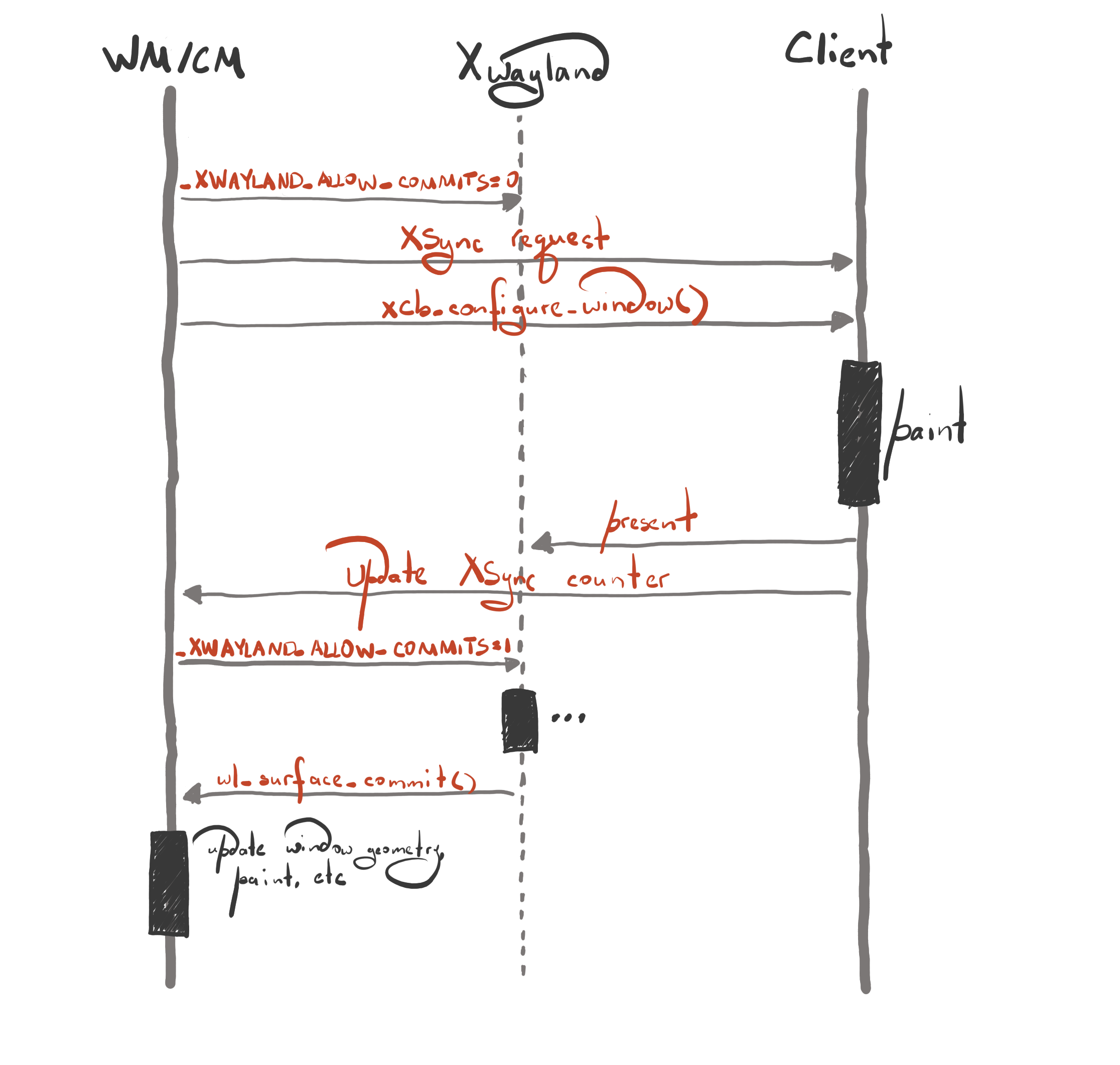
  1. The compositor blocks wl_surface commits by setting the _XWAYLAND_ALLOW_COMMITS property to 0 for the toplevel X11 window. This is needed to ensure the consistent order between XSync request acknowledgements and wl_surface commits. As long as the _XWAYLAND_ALLOW_COMMITS property is set to 0, Xwayland will not attempt to commit the wayland surface, for example attach a new graphics buffer after the client repaints the window;
  2. The compositor sends a _NET_WM_SYNC_REQUEST client message as before;
  3. The compositor resizes the client window as before;
  4. The client repaints the window and acknowledges the XSync request as before;
  5. After receiving the XSync acknowledgement, the compositor unblocks surface commits by setting the _XWAYLAND_ALLOW_COMMITS property to 1. Note that the window updates are still blocked, i.e. the window position is not updated yet;
  6. After Xwayland commits the wl_surface with a new graphics buffer, the window updates are unblocked, e.g. the window position is updated.

The frame synchronization process looks more involved with Xwayland, but it is still manageable.

_NET_WM_SYNC_REQUEST support in applications

Most applications that use GTK and Qt support _NET_WM_SYNC_REQUEST, but there are applications that don’t participate in the frame synchronization protocol. If you use one of those apps, you will observe visual glitches during interactive resize.

Closing words

Frame synchronization is a difficult problem, and requires some very intricate code both on the compositor and the client side. But with the changes that we’ve made, I’m proud to say that KWin is one of the few compositors that properly handles frame synchronization for X11 windows on Wayland.

I would also like to express many thanks to the Xwayland developers (Michel Dänzer and Olivier Fourdan) for helping and assisting us with fixing the glitch.
SVG cursors: everything that you need to know about them

SVG cursor themes is a new feature in Plasma 6.2, which we are really excited about. In this blog post, I would like to provide more background behind what motivated us to add support for them, what they are, and how to build them.

(Classic) cursor theme format

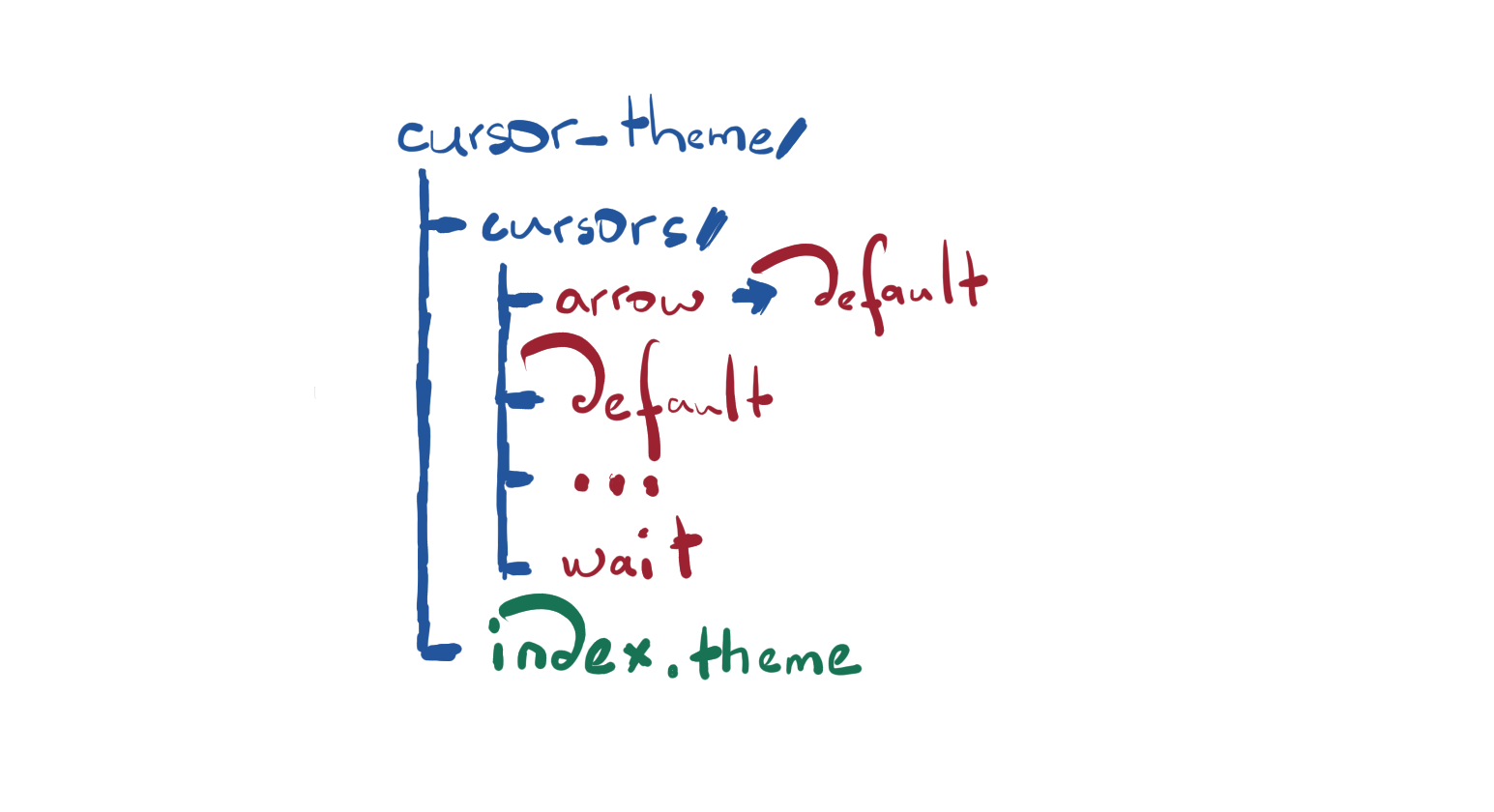
A cursor theme is a collection of images defining the contents of various cursor shapes and additional metadata (for example, the human readable name of the theme, whether the cursor theme inherits/extends another cursor theme, etc). On disk, it looks as follows

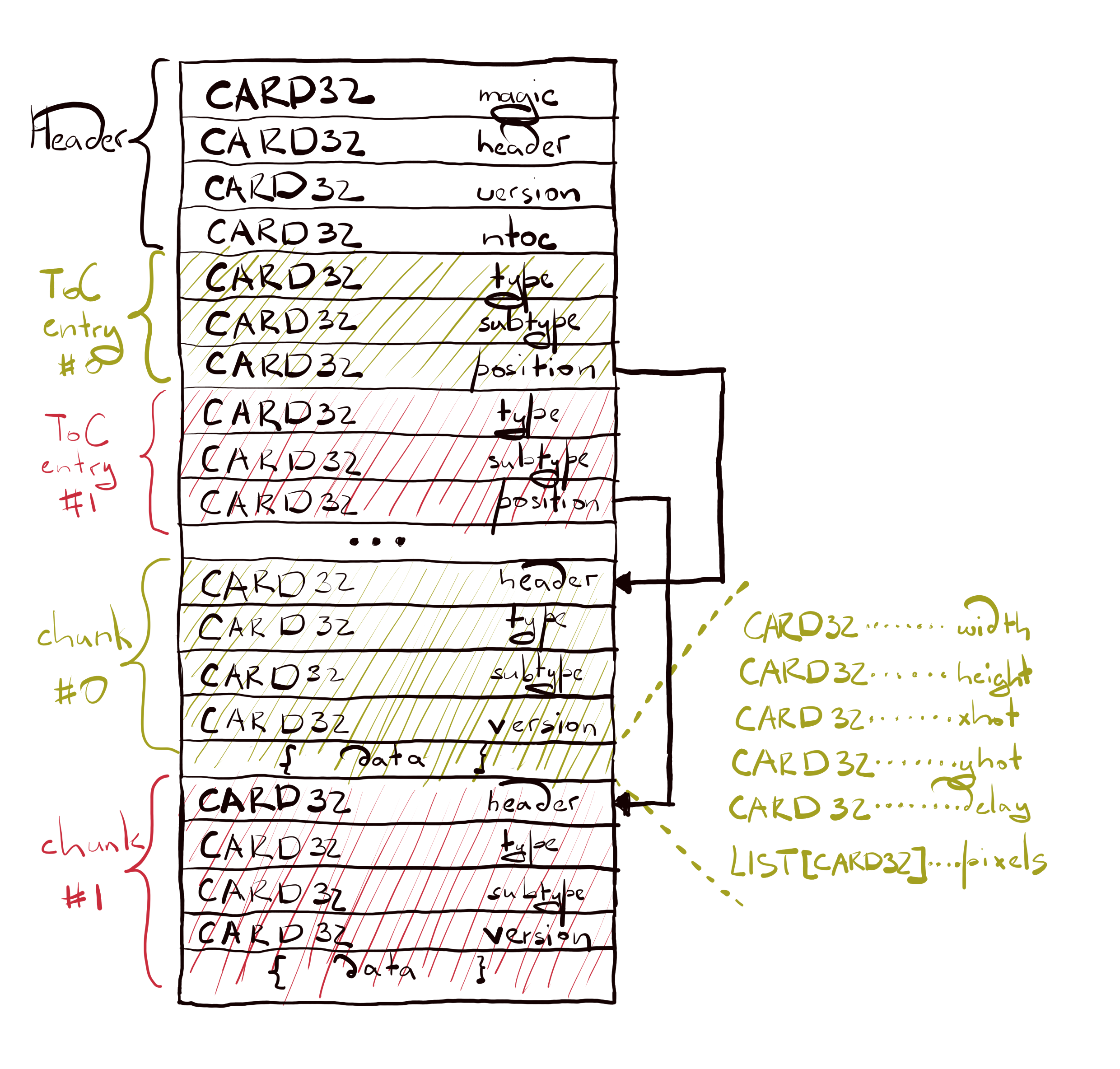
The cursors/ directory contains a list of Xcursor files and symbolic links to represent cursor shape aliases, e.g. the arrow being an alias for default. The XCursor format has been in use for a very long time now and it has a pretty simple structure

An XCursor file consists of a header that includes a magic number to determine whether particular file is actually an XCursor file, the size of the header in bytes, the file version, and the number of ToC entries. Every ToC entry provides the information about the corresponding chunk, for example the chunk type and where the chunk can be found in the file. Lastly, a chunk contains some useful data. A chunk may contain image data or text data, etc.

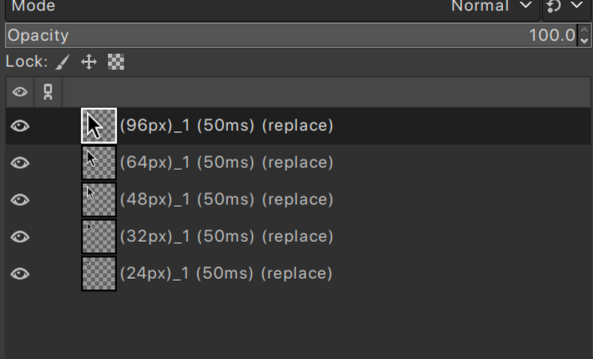
For example, here’s the image data that can be found in the “default” cursor shape file in the Adwaita cursor theme

As you can see, the Adwaita cursor theme provides the following sizes: 24, 32, 48, 64, and 96.

The index.theme files looks as follows

[Icon Theme]
Inherits=breeze_cursors
Name=Cool Cursor
Comment=That is a cool cursor theme

Cursor themes can be found in $DATADIR/icons directories. For example, /usr/share/icons or ~/.local/share/icons.

X11 vs Wayland cursors

Xcursor cursors are used both on X11 and Wayland, but the way how the cursor size is interpreted is different on the two platforms. X11 assumes that the cursor size is specified in the device pixels, while Wayland assumes that it’s in the logical pixels. Logical pixels have the same visual size across various devices, while physical pixels are specific to particular device. For example, 24 logical pixels on an output with a scale factor of 2 corresponds to 48 physical pixels.

Cursor sizes in Xcursor files are specified in the device pixels.

Another very important detail is that the XCURSOR_SIZE environment variable is treated differently by X11 and Wayland native applications. For example, if XCURSOR_SIZE is set to 24 and the output scale is 2, an X11 application would load a cursor with the size 24, but a Wayland application would effectively load a cursor with the size 48 (24 * 2) because it would see that the output is scaled so the provided cursor needs to be scaled accordingly as well.

“XCURSOR_SIZE=24 dolphin -platform xcb” (left) vs “XCURSOR_SIZE=24 dolphin -platform wayland” (right). Note that “Apply scaling themselves” has been selected in the display settings in Plasma Wayland

Limitations of Xcursor

The most painful thing about Xcursor is its lack of the proper HiDPI support. As it was said in the previous chapter, the cursor size in Xcursor files is specified in the device pixels. On X, it’s not a problem because all geometries are specified in the device pixels. It also means that if you change the scaling factor on X, you need to change the cursor size manually so the cursor is not too small. On Wayland, the cursor size is specified in the logical pixels so the compositor and the clients have to scale the cursor size in order to match the output scale. For example, if the configured cursor size is 24 and the window is on an output with a scale factor of 2, the application needs to load an Xcursor cursor with the size 48. If the cursor theme provides cursors with such a size, perfect! But what if it doesn’t? At the moment, every compositor and client applies its own policies. Some find the cursor with the closest size and use that, some find the cursor with the closest size and then scale it to match the requested size at the cost of adding some blurriness, and so on. It’s a mess. Because neither compositors nor clients can agree how to handle such a case, you could easily observe the cursor changing its size when moving between windows owned by different applications or when moving the cursor between the window and its decoration, e.g.

It’s worth noting though that this issue can be worked around by using the cursor-shape protocol because with it, the application can delegate the compositor the task of loading and displaying cursors. But the bottom line is that the Xcursor format is unsuitable for the HiDPI model that we have present on Wayland.

Another issue with the Xcursor format is that the image data is stored in an uncompressed format. It is okay if you need to provide cursors with small sizes, for example up to 72, but there are cases when you need to display a cursor at a very large size. For example, one such a case is the shake cursor accessibility feature in the Plasma Wayland session.

With the shake cursor feature enabled, the cursor will be inflated when it’s shaken. In order to operate, it needs to load the default cursor shape with a size around 250. If cursor themes provided images for such sizes, their package sizes would easily blow up beyond the 100MiB mark. That’s not good. And as a workaround, in Plasma 6.1, the shake cursor uses its own high resolution images of the Breeze cursor themes.

The XCursor format was perfectly suitable for the use cases that existed back in the late 90s and early 2000s, but things have changed over the years and its current raster nature can’t keep up with the use cases that we have now (2024). We’ve got fractional scaling, we’ve got accent colors, we’ve got features that enlarge the cursor, and so on.

SVG cursor format

First of all, let’s build a list of requirements that the svg cursor format must satisfy:

  • obviously, it must support the ability to define cursor contents using svg files so we can fix HiDPI issues, etc
  • easy porting process for existing clients and compositors
  • it should be easy to develop and analyze svg cursor themes. Xcursor is a binary file format, which requires a special tool to create Xcursor files, we would like to avoid that with svg cursors
  • last and the most important requirement is that there must be some compatibility with the existing cursor theme format. We must not be required to write a new system settings module to handle the new cursor format, and the apps that don’t support svg cursors should easily fallback to the Xcursor format.

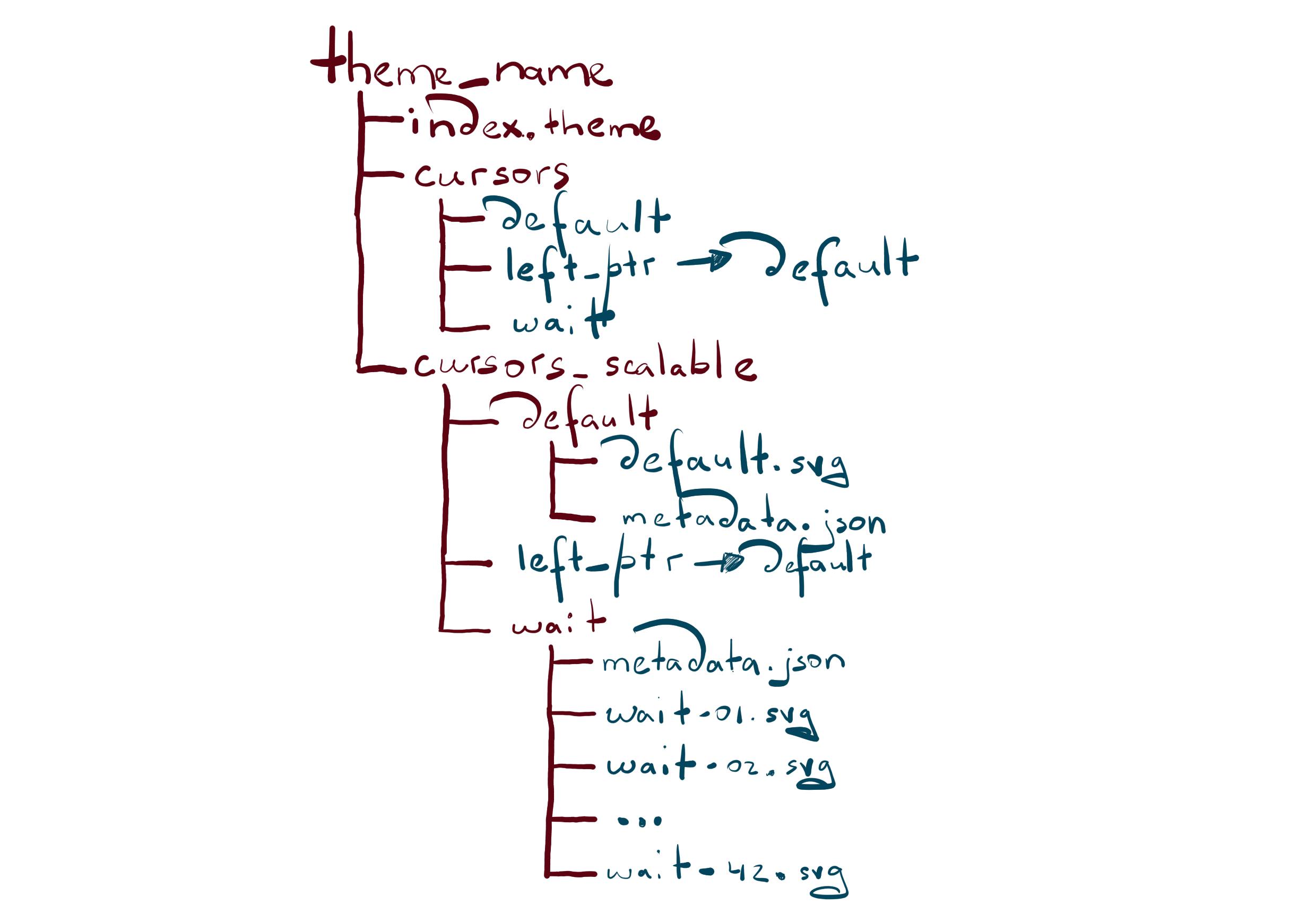
Here’s how a cursor theme providing svg cursors would look like

index.theme has the same format both for XCursor and SVG cursors. cursors/ directory contains the XCursor cursors, and cursors_scalable/ contains the SVG cursors.

In cursors_scalable/, every cursor shape must have its own directory, or if it’s an alias, then it must be a symlink. Every cursor shape directory must contain the cursor image and a metadata.json file providing the information about the cursor.

For a static cursor, the metadata.json file looks as follows

[
   {
       "filename": "default.svg",
       "hotspot_x": 4,
       "hotspot_y": 4,
       "nominal_size": 24
   }
]

The filename property specifies the filename of the svg file. The hotspot_x and the hotspot_y properties specify the coordinates of the hot spot. The hot spot in the cursor determines the point where interaction with other elements on the screen occurs, e.g. clicks. The nominal_size property specifies the cursor size that the svg file represents. The nominal size is used to decide how much the svg image and the hotspot coordinates need to be scaled in order to get a cursor with the requested size. Note that the nominal size can’t be determined based on the <svg>‘s width and height attributes because there exist themes such as Breeze whose canvas is bigger than the represented cursor size. As an example, in the Breeze cursor theme, the canvas size is 32x32 even though the represented cursor size is 24 in order to accommodate for additional elements that can be attached to the arrow cursor, e.g. a little circle with a plus sign or a question mark.

For an animated cursor, the metadata.json file looks as follows

[
    {
        "filename": "wait-01.svg",
        "delay": 30,
        "hotspot_x": 16,
        "hotspot_y": 15,
        "nominal_size": 24
    },
    {
        "filename": "wait-02.svg",
        "delay": 30,
        "hotspot_x": 16,
        "hotspot_y": 15,
        "nominal_size": 24
    },
    ...
    {
        "filename": "wait-42.svg",
        "delay": 30,
        "hotspot_x": 16,
        "hotspot_y": 15,
        "nominal_size": 24
    }
]

The only new thing is the delay property. The delay property indicates the animation delay to the next frame.

A cursor theme that ships SVG cursors is required to have XCursor cursors too. This is needed to provide fallback for legacy applications that are unaware of the cursor-shape-v1 protocol or simply too old applications that are unlikely to be changed anymore. This restriction might be lifted in the future.

It is worth mentioning that SVG supports animations natively. However, that approach was not chosen for cursor animations for two reasons: to allow caching svg render results more easily and require fewer changes in the compositors and the apps to adapt the svg cursor format.

You can find the json schema for metadata.json over here.

Accent colors

Since the cursor contents is specified using the SVG format, it should be possible to re-color the cursor based on the currently configured accent color. As of now, it is not implemented, but, in general, this is doable and perhaps such a feature will be added to Plasma some day.

Standardization

This cursor format is not officially standardized. We are looking forward to making it upstream, but for now, the main focus is on confirming that the new format lives up to our and cursor creator needs.

To cursor theme creators

Breeze and Breeze Light are the only two cursor themes that support SVG cursors at the moment, but we would love to see custom themes adapting them too so users experience fewer issues with fractional scaling or other features in Plasma when using their favorite 3rdparty cursor themes. We would also like to hear feedback from the cursor theme creators regarding whether it’s easy to adapt this cursor format or whether some additional features are needed. You can reach out to us at Matrix in the #kwin room https://webchat.kde.org/#/room/#kwin:kde.org or in the kwin mailing list.

Examples

If you need an example of a cursor theme that supports SVG cursors, please check the Breeze cursor theme.

Closing words

The new SVG cursor format is amazing. Please try it!