Improving Xwayland window resizing

One of the quickest ways to determine whether particular application runs using Xwayland is to resize one of its windows and see how it behaves, for example

While it can be handy for the debugging purposes, overall, it makes the Plasma Wayland session look less polished. So, one of the goals for 6.3 was to fix this visual glitch.

This article will provide some background behind what caused the glitch and how we addressed it. Just in case, here’s the same application, which was shown in a screen cast above, but with the corresponding resizing fixes in:

X11 frame synchronization protocol(s)

On X11, all window changes typically take place immediately, including resizing. This can lead to some issues. For example, if a window is resized, it can take a while until the application repaints the window with the new size. What if the compositing manager decides to compose the screen in meanwhile? You’re likely going to see some sort of visual glitches, e.g. the window contents getting cropped or seeing parts of the window that have not been repainted yet.

In order to address this issue, there exists an X11 protocol to synchronize window repaints during interactive resize. An application/client wishing to participate in this protocol needs to list _NET_WM_SYNC_REQUEST in the WM_PROTOCOLS property of the client window and also set the XID of the XSync counter in the _NET_WM_SYNC_REQUEST_COUNTER property. When the WM wants to resize the window, the following will happen:

  1. The window manager sends a _NET_WM_SYNC_REQUEST client message containing a serial that the client will need to put in the XSync counter after processing a ConfigureNotify event that will be generated after the window is resized. The compositing manager and the window manager will block window updates until the XSync request acknowledgement is received;
  2. The WM resizes the client window, for example by calling the xcb_configure_window() function;
  3. The client would then repaint the window with the new size and update the XSync counter with the serial that it had received in step 1;
  4. The window manager and the compositing manager unblock window updates after receiving receiving the XSync request acknowledgement. For example, now, the window can be repainted by the compositing manager and there shouldn’t be glitches as long as the client behaves well.

Note that the window manager and the compositing manager are often the same. For example, both KWin and Mutter are compositing managers and window managers.

The frame synchronization protocol described above is called basic frame synchronization protocol. There is also an extended frame synchronization protocol, but it is not standardized and it is implemented only by a few compositing managers.

_NET_WM_SYNC_REQUEST and Xwayland

KWin supports the basic frame synchronization protocol, so there should be no visual glitches when resizing X11 windows in the Plasma Wayland session, right? At quick glance, yes, but we forget about the most important detail: Wayland compositors don’t use XCompositeNameWindowPixmap() or xcb_composite_name_window_pixmap() to grab the contents of X11 windows, instead they rely on Xwayland attaching graphics buffers to wl_surface objects, so there is no strict order between the Wayland compositor receiving an XSync request acknowledgement and graphics buffers for the new window size.

In order to help better understand the issue, let’s consider a concrete example. Assume that a window with geometry 0,0 100x100 is being resized by dragging its left edge. If the left edge is dragged 10px to the right, the following will happen:

  1. A _NET_WM_SYNC_REQUEST client message will be sent to the client containing the XSync counter serial that must be set after processing the ConfigureNotify event that will be generated after the Wayland compositor calls xcb_configure_window() with the new window size;
  2. The Wayland compositor calls xcb_configure_window() to actually resize the window;
  3. The client receives the sync request client message and the ConfigureNotify event, repaints the window, and acknowledges the sync request;
  4. The Wayland compositor receives the sync request acknowledgement and updates the window position to 10,0.

But here is the problem, when the window position is updated to 10,0, it’s not guaranteed that the wl_surface associated with the X11 window has a buffer with the new window size, i.e. 90x100. It can take a while until Xwayland commits a graphics buffer with the right size. In meanwhile, the compositor could compose the next frame with the new window position, i.e. 10,0, but old surface size, i.e. 100x100. It would look as if the right window edge sticks out of the window decoration. After Xwayland attaches a buffer with the right size, the right window edge will correct itself.

So, ideally, the Wayland compositor should update the window position after receiving the XSync request acknowledgement and Xwayland attaching a new graphics buffer to the wl_surface.

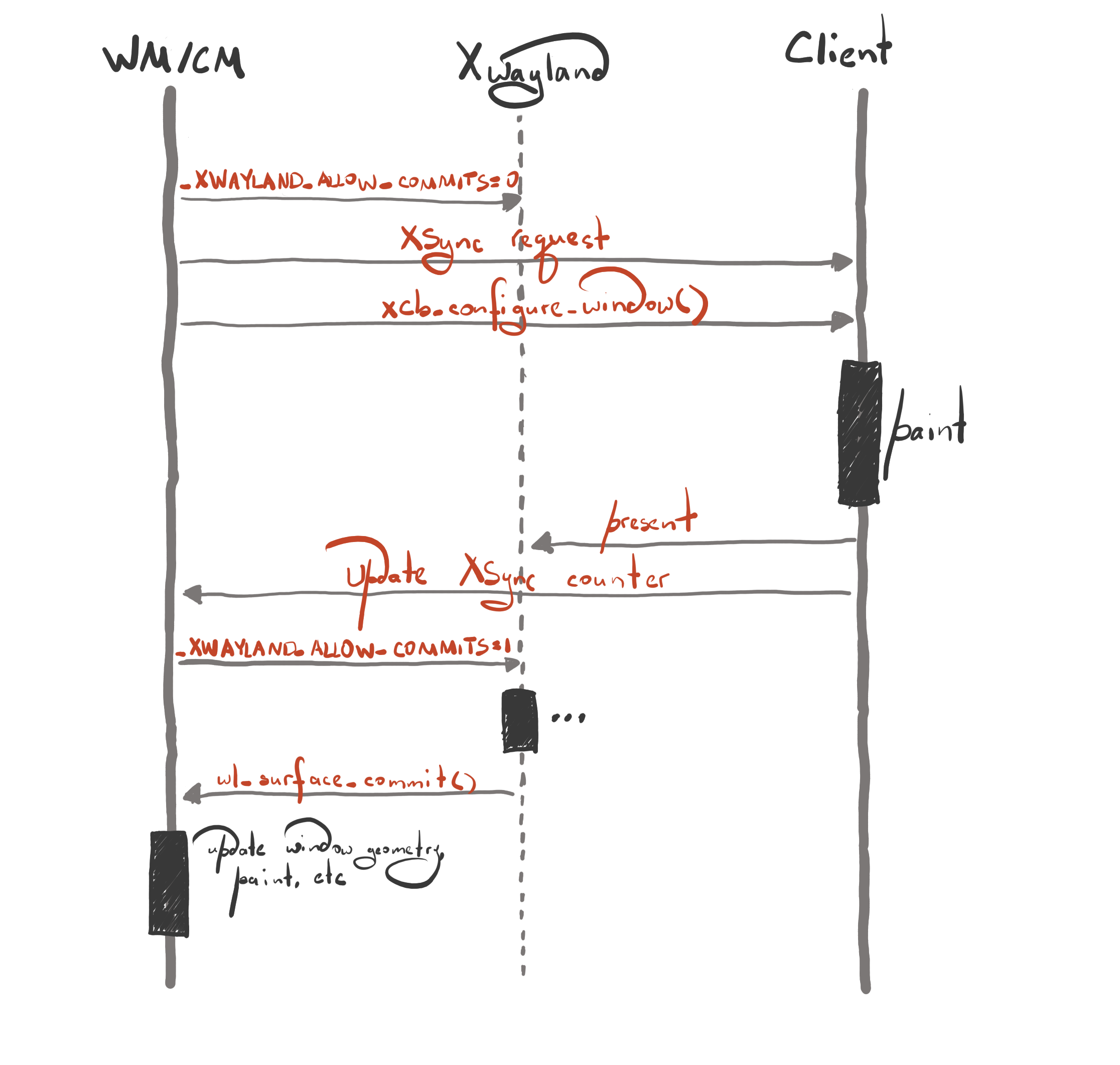
With that in mind, the frame synchronization procedure looks as follows:

  1. The compositor blocks wl_surface commits by setting the _XWAYLAND_ALLOW_COMMITS property to 0 for the toplevel X11 window. This is needed to ensure the consistent order between XSync request acknowledgements and wl_surface commits. As long as the _XWAYLAND_ALLOW_COMMITS property is set to 0, Xwayland will not attempt to commit the wayland surface, for example attach a new graphics buffer after the client repaints the window;
  2. The compositor sends a _NET_WM_SYNC_REQUEST client message as before;
  3. The compositor resizes the client window as before;
  4. The client repaints the window and acknowledges the XSync request as before;
  5. After receiving the XSync acknowledgement, the compositor unblocks surface commits by setting the _XWAYLAND_ALLOW_COMMITS property to 1. Note that the window updates are still blocked, i.e. the window position is not updated yet;
  6. After Xwayland commits the wl_surface with a new graphics buffer, the window updates are unblocked, e.g. the window position is updated.

The frame synchronization process looks more involved with Xwayland, but it is still manageable.

_NET_WM_SYNC_REQUEST support in applications

Most applications that use GTK and Qt support _NET_WM_SYNC_REQUEST, but there are applications that don’t participate in the frame synchronization protocol. If you use one of those apps, you will observe visual glitches during interactive resize.

Closing words

Frame synchronization is a difficult problem, and requires some very intricate code both on the compositor and the client side. But with the changes that we’ve made, I’m proud to say that KWin is one of the few compositors that properly handles frame synchronization for X11 windows on Wayland.

I would also like to express many thanks to the Xwayland developers (Michel Dänzer and Olivier Fourdan) for helping and assisting us with fixing the glitch.

Scene Items in KWin

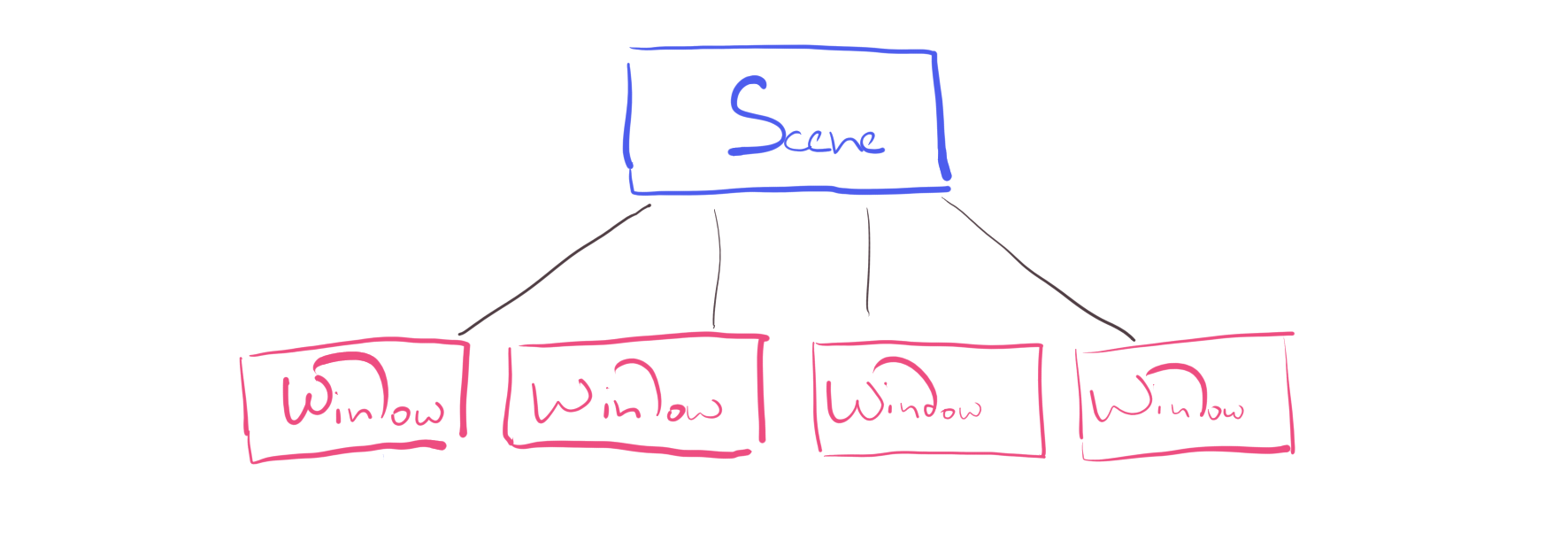
If your background includes game development, the concept of a scene should sound familiar. A scene is a way to organize the contents of the screen using a tree, where parent nodes affect their child nodes. In a game, a scene would typically consist of elements such as lights, actors, terrain, etc.

KWin also has a scene. With this blog post, I want to provide a quick glimpse at the current scene design, and the plan how it can be improved for Wayland.

Current state

Since compositing functionality in KWin predates Wayland, the scene is relatively simple, it’s just a list of windows sorted in the stacking order. After all, on X11, a compositing window manager only needs to take window buffers and compose them into a single image.

With the introduction of Wayland support, we started hitting limitations of the current scene design. wl_surface is a quite universal thing. It can used to represent the contents of a window, or a cursor, or a drag-and-drop icon, etc.

Since the scene thinks of the screen in terms of windows, it needs to have custom code paths to cover all potential usages of the wl_surface interface. But doing that has its own problems. For example, if an application renders cursors using a graphics api such as OpenGL or Vulkan, KWin won’t be able to display such cursors because the code path that renders cursors doesn’t handle hardware accelerated client buffers.

Another limitation of the current scene is that it doesn’t allow tracking damage more efficiently per each wl_surface, which is needed to avoid repainting areas of the screen that haven’t changed and thus keep power usage low.

Introducing scene items

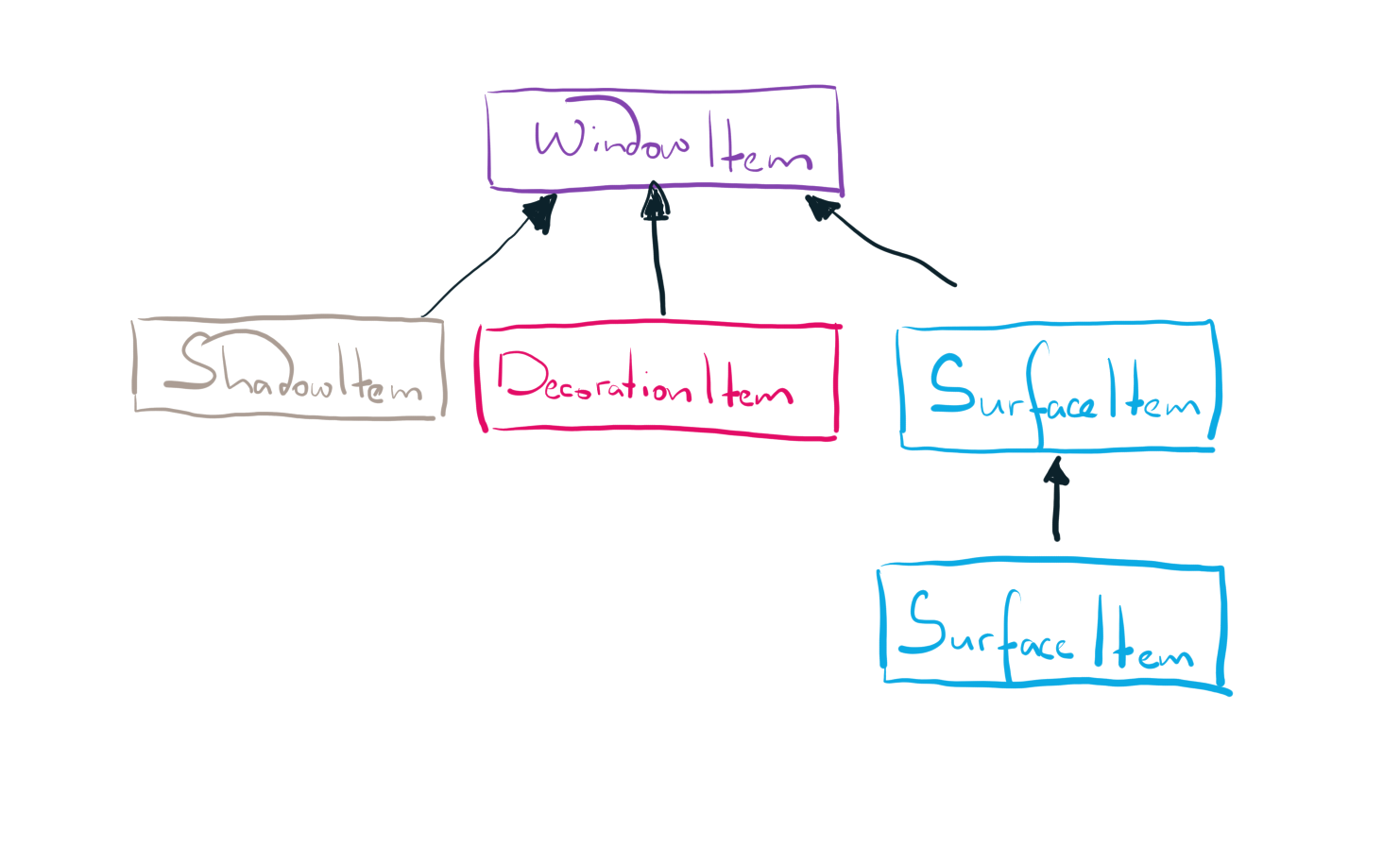
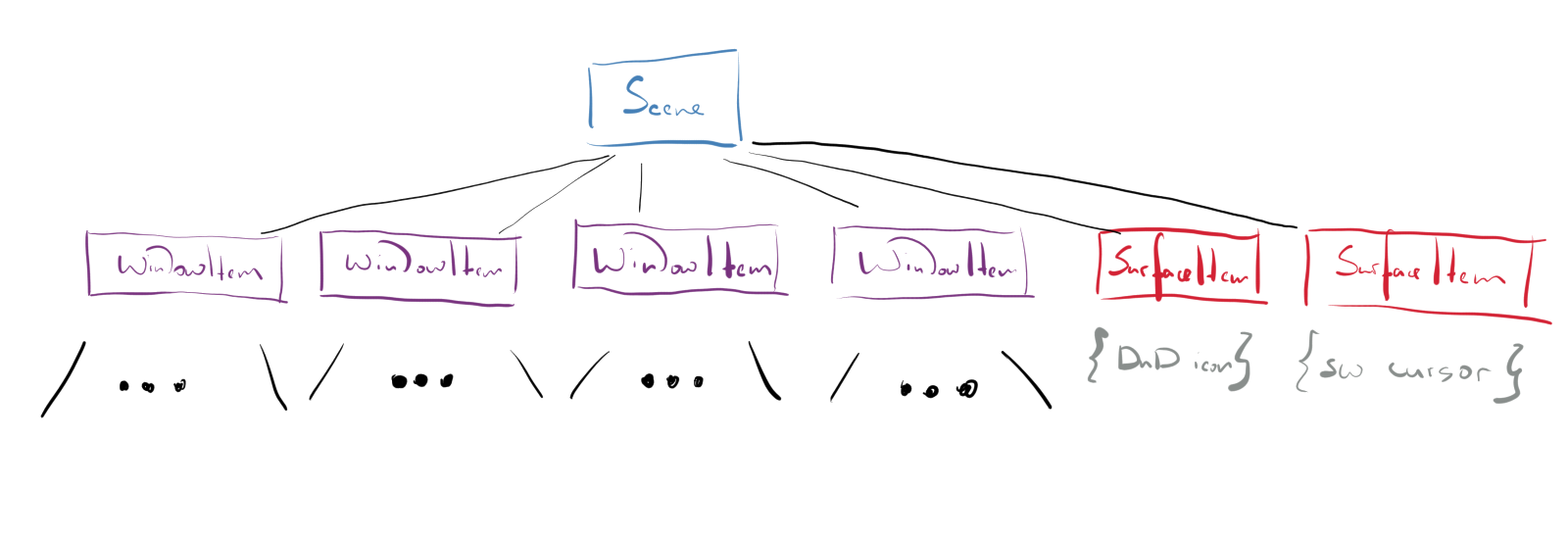
The root cause of our problems is that the scene thinks of the contents of the screen in terms of windows. What if we stop viewing a window as a single, indivisible object? What if we start viewing every window as something that’s made of several other items, e.g. a surface item with window contents, a server-side decoration item, and a nine-tile patch drop shadow item?

A WindowItem is composed of several other items – a ShadowItem, a DecorationItem, and a SurfaceItem

With such a design, the scene won’t be limited only to windows, for example we could start putting drag-and-drop icons in it. In addition to that, it will be possible to reuse the code that paints wl_surface objects or track damage per individual surface

Besides windows, the scene contains a drag-and-drop icon and a software cursor

Another advantage of the item-based design is that it will provide a convenient path towards migration to a scene/render graph, which is crucial for performing compositing on different threads or less painful transition to Vulkan.

Work done so far

At the end of March, an initial batch of changes to migrate to the item-based design was merged. We still have a lot of work ahead of us, but even with those initial changes, you will already see some improves in the Wayland session. For example, there should less visual artifacts in applications that utilize sub-surfaces, e.g. Firefox.

The end goal of the transition to the item-based design is to have a more flexible and extensible scene. So far, the plan is to continue doing refactorings and avoid rewriting the entire compositing machinery, if possible. You can find out more about the scene redesign progress by visiting https://invent.kde.org/plasma/kwin/-/issues/30.

Conclusion

In short, we still have some work to do to make rendering abstractions in KWin fit well all the cases that there are on Wayland. However, even with the work done so far, the results are very promising!

Compositing Scheduling in KWin: Past, Present, and Future

From time to time, we receive regular complaints about frame scheduling. In particular, compositing not being synchronized to vblanks, missed frames, repainting monitors with different refresh rates, etc. This blog post will (hopefully) explain why these issues are present and how we plan to fix them.

Past & Present

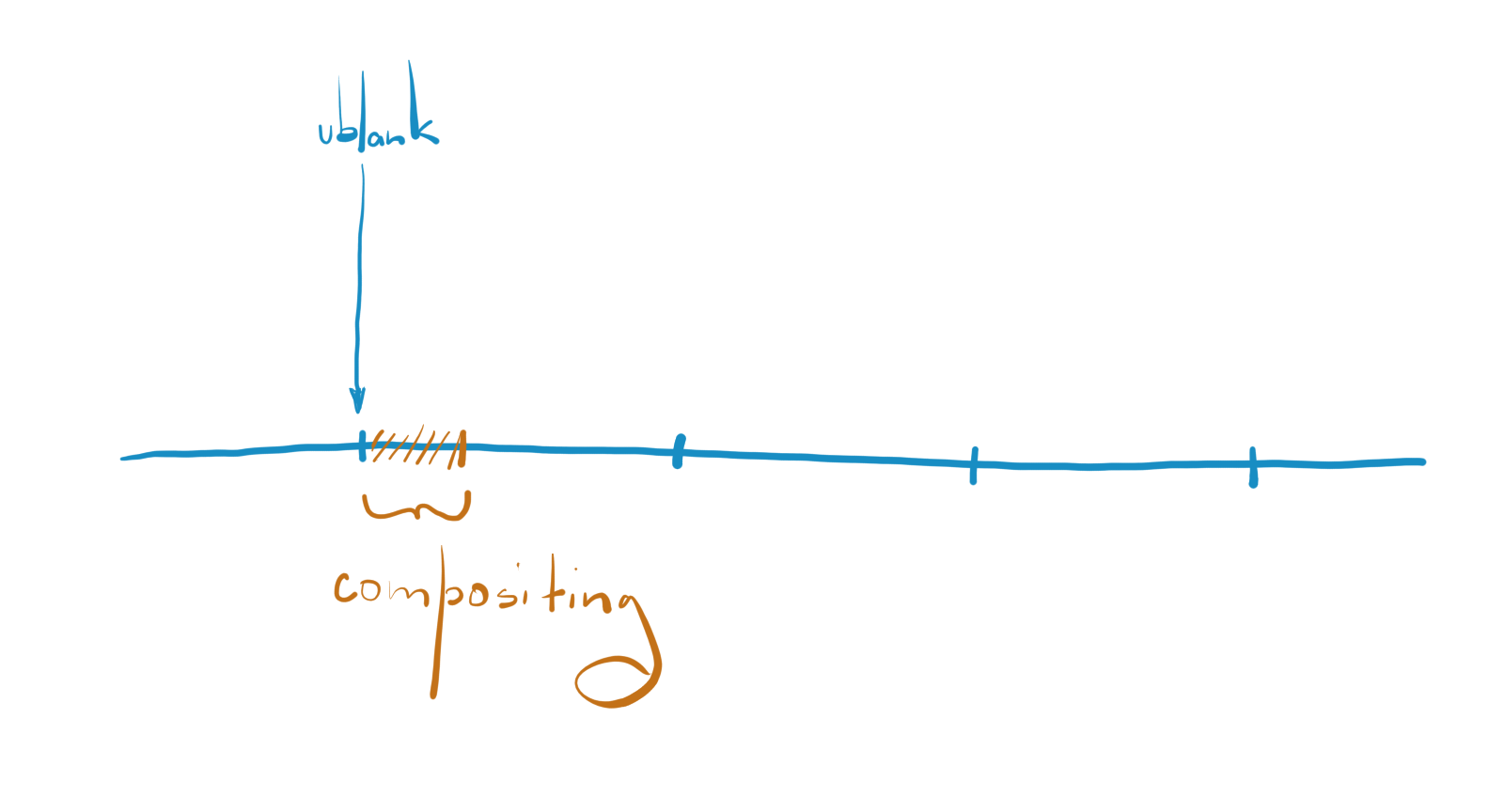
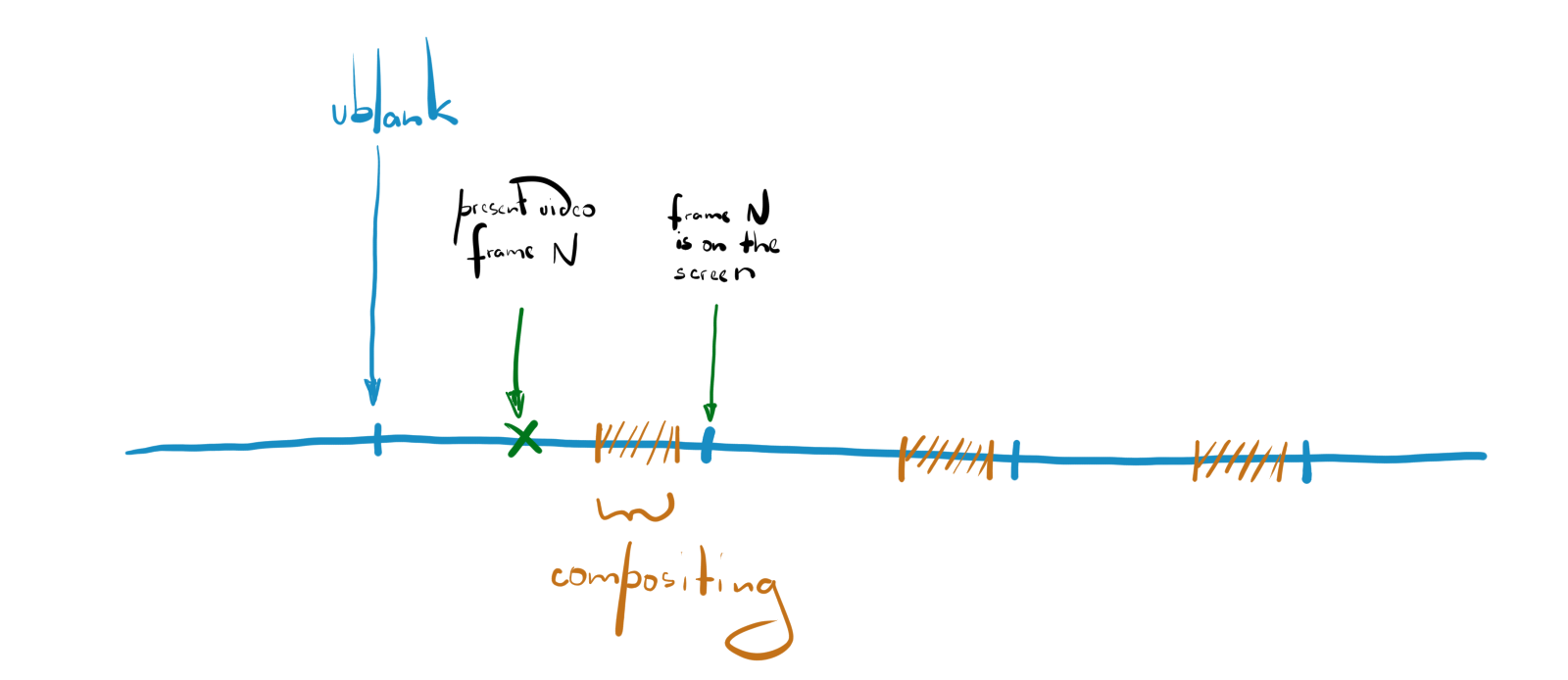
With the current scheduling algorithm, compositing /should/ start immediately right after a vblank. A vblank is the time between the vertical front porch and the vertical back porch, or simply put, it’s the time when the display starts scanning out the contents of the next frame.

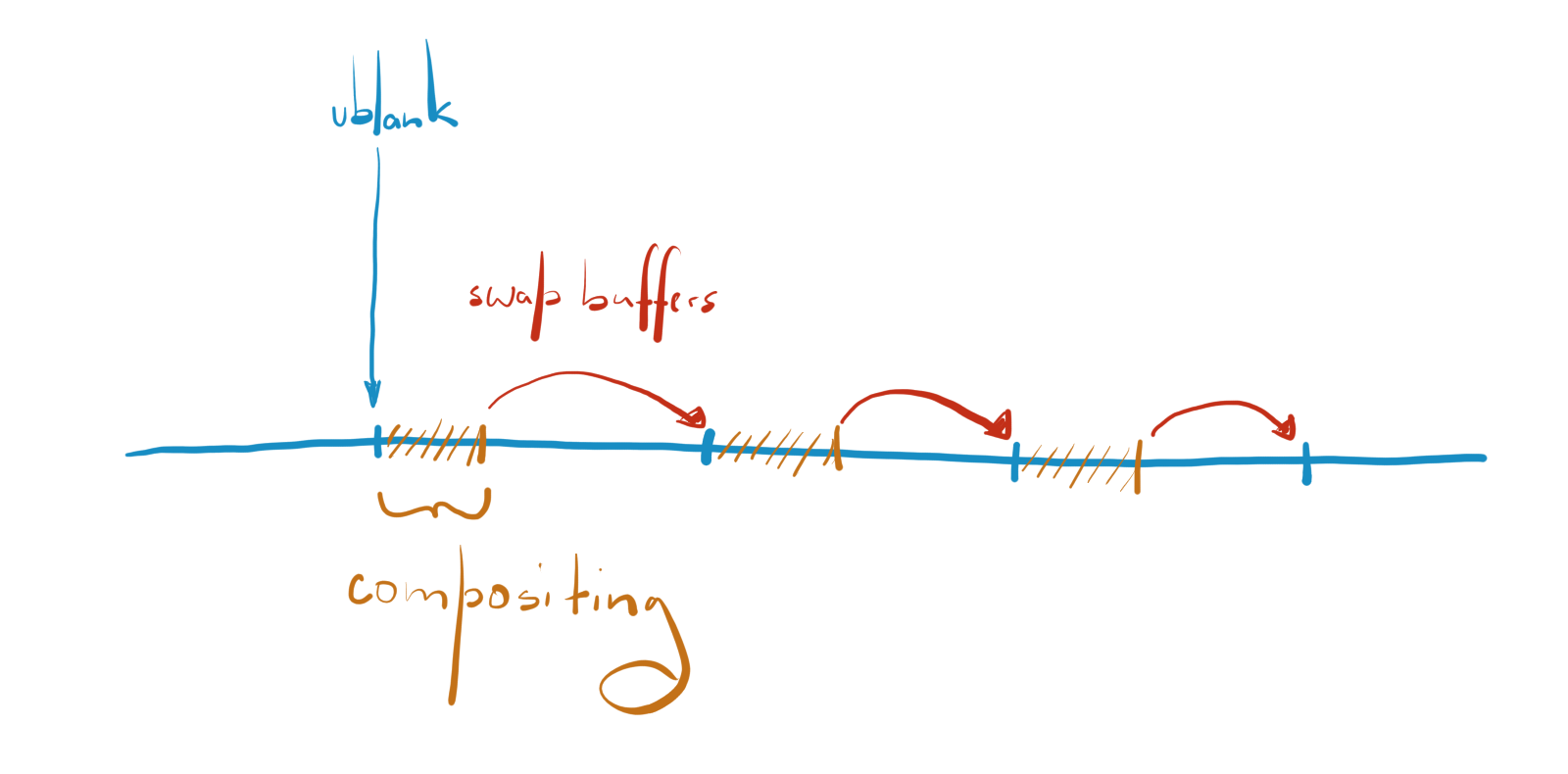
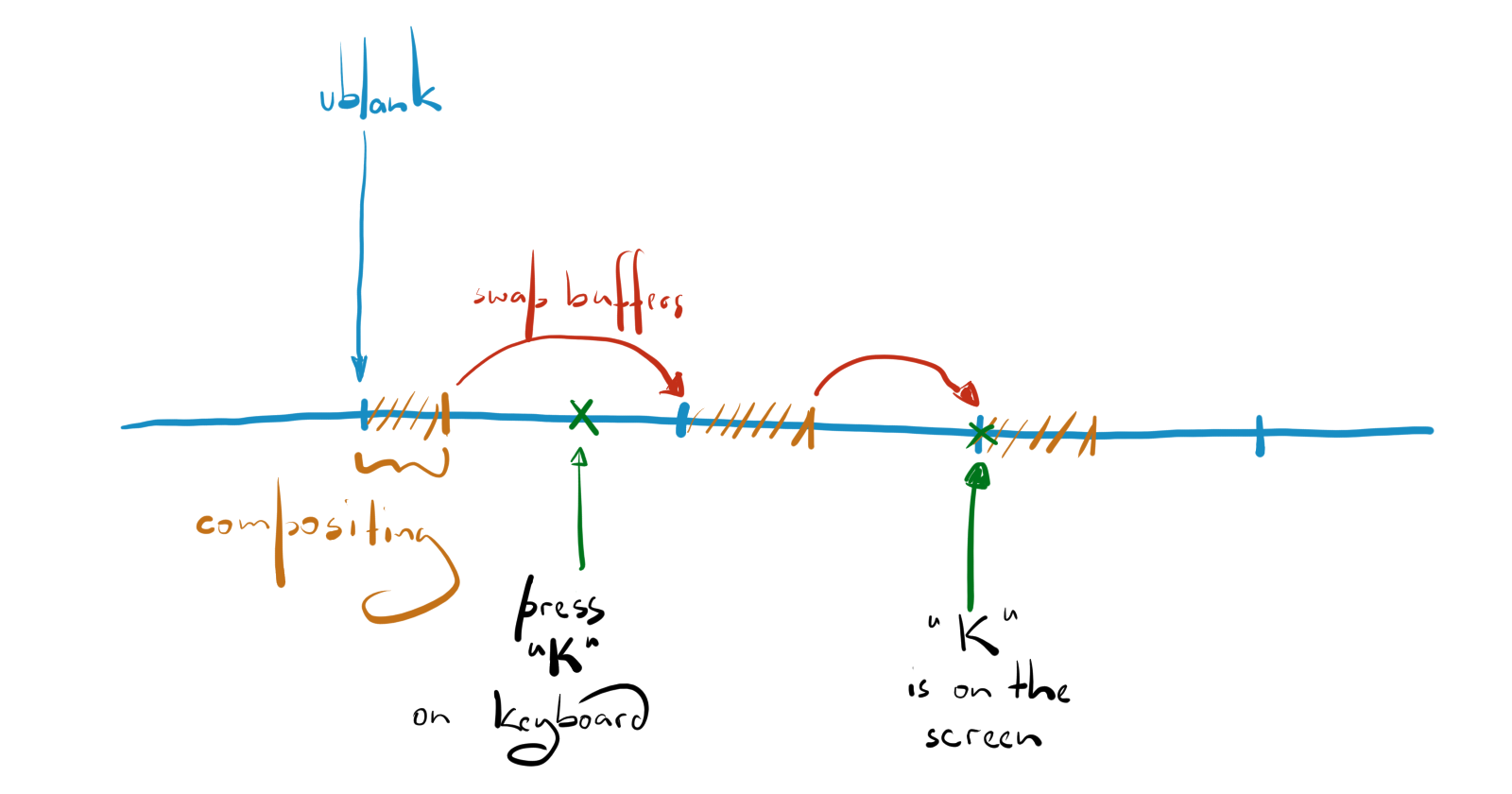
One thing that’s worth point out is that buffers are not swapped after finishing a compositing cycle, they are swapped at the start of the next compositing cycle, in other words, at the next vblank

KWin assumes that glXSwapBuffers() and eglSwapBuffers() will always block until the next vblank. By delaying the buffer swap, we have more time to process input events, do some window manager things, etc. But, this assumption is outdated, nowadays, it’s rare to see a GLX or an EGL implementation where a buffer swap operation blocks when rendering double buffered.

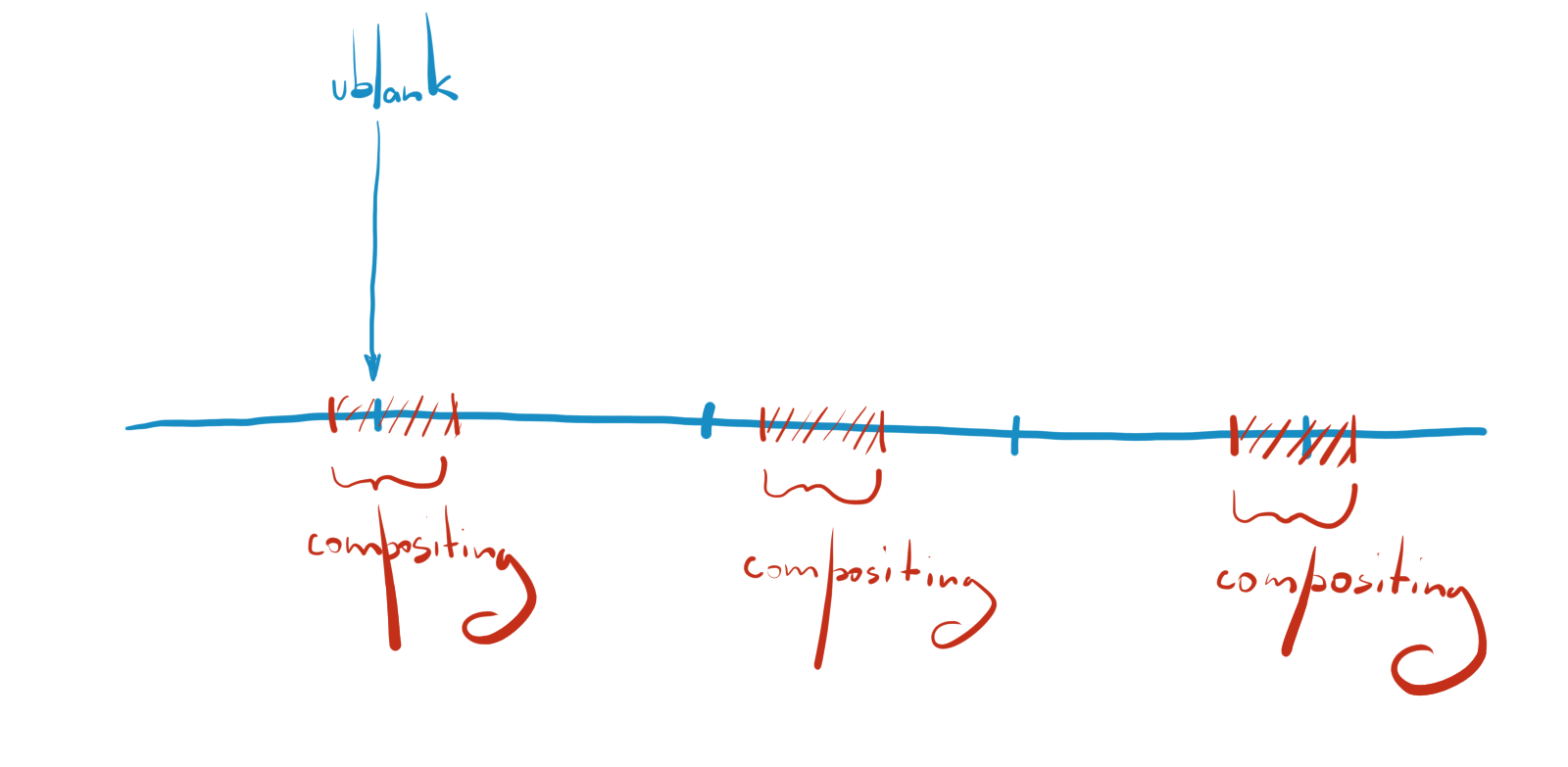
In case the buffer swap operation doesn’t block, which is typically the case with Mesa drivers, glXSwapBuffers() or eglSwapBuffers() will be called at the end of a compositing cycle. There is a catch though. Compositing won’t be synchronized to vblanks.

Since compositing is not synchronized with vblanks anymore, you may notice that animations in some application don’t look butter smooth as they should. This issue can be easily verified using the black frame insertion test [1].

Another problem with our compositing scheduling algorithm is latency. Ideally, if you press a key, the corresponding symbol should show up on the screen as soon as possible. In practice, things are slightly different

With the current compositing timing, if you press a key on the keyboard, it may take up to two frame before the corresponding symbol shows up on the screen. Same thing with videos, the audio might be playing two frames ahead of what is on the screen.

Monitors With Different Refresh Rates

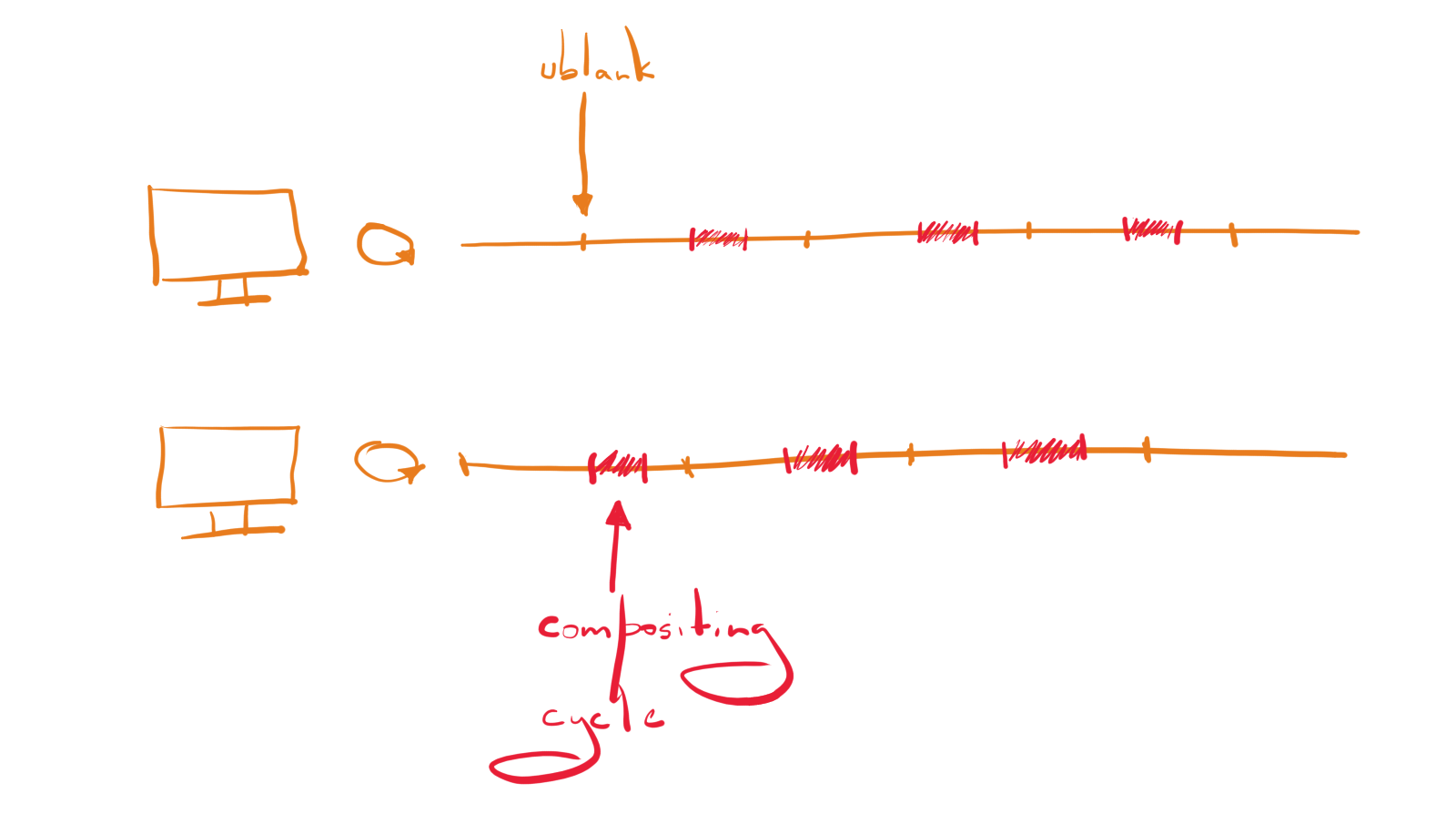
Things get trickier if you have several monitors and they have different refresh rates. On X11, compositing is throttled to the lowest common refresh rate, in other words if you have two monitors with a refresh rate of 60Hz and one with a refresh rate of 120Hz, compositing will be performed at a rate of 60Hz. There is probably nothing that we can do about it.

On Wayland, it’s a completely different situation. From the technical point of view, we don’t have anything that prevents compositing being performed separately per screen at different refresh rates. But due to historical reasons, compositing on Wayland is throttled similar to the X11 case.

Future

Our main goals are to unlock true per screen rendering on Wayland and reduce latency caused by compositing (both on X11 and Wayland). Some work [2] has already been started to fix compositing timing and if things go smoothly, you should be able to enjoy improved frame timings in KDE Plasma 5.21.

If we start compositing as close as possible to the next vblank, then applications, such as video players, will be able to get their contents on the screen in the shortest amount of time without inducing any screen tearing.

The main drawback of this approach is that the compositor has to know how much time exactly it will take to render the next frame. In other words, we need a reliable way to predict the future, easy, no problem!

The main idea behind the compositing timing rework is to introduce a new class, called RenderLoop, that notifies the compositor when it’s a good time to start painting the next frame. On X11, there is going to be only one RenderLoop. On Wayland, every output is going to have its own RenderLoop.

As it was mentioned previously, the compositor needs to predict how long it will take to render the next frame. We solve this inconvenient problem by making two guesses:

  • The first guess is based on a desired latency level that comes from a config. If the desired latency level is high, the predicted render time will be longer; on the other hand, if the desired latency level is low, the predicted render time will be shorter;
  • The second guess is based on the duration of previous compositing cycles.

The RenderLoop makes two guesses and the one with the longest render time is used for scheduling compositing for the next frame. By making two estimates rather than one, hopefully, animations will be more or less stable.

There is no “silver bullet” solution for the render time prediction problem, unfortunately. In the end, it all comes down to making a trade-off between latency and stability. The config option lets the user decide what matters the most. It’s worth noting that with the default latency level, the compositor will make a compromise between frame latency and animation stability that should be good enough for most of users.

The introduction of the RenderLoop helper is only half of the battle. At the moment, all compositing is done on the main thread and it can get crowded. For example, if you have several outputs with different refresh rates, some of them will have to wait until it’s their turn to get repainted. This may result in missed vblanks, and thus laggy frames. In order to address this issue, we need to put compositing on different threads. That way, monitors will be repainted independently of each other. There is no concrete milestone for compositing on different threads, but most likely, it’s going to be KDE Plasma 5.22.

Conclusion

Currently, compositing infrastructure in KWin is heavily influenced by the X11 requirements, e.g. there is only one compositing clock, compositing is throttled to the lowest refresh rate, etc. Besides that, incorrect assumptions were made about the behavior of glXSwapBuffers() and eglSwapBuffers(), unfortunately, which result in frame drops and other related issues. With the ongoing Wayland improvements, we hope to fix the aforementioned issues.

Links

[1] https://www.testufo.com/blackframes#count=2&bonusufo=1&equalizer=1&background=000000

[2] https://invent.kde.org/plasma/kwin/-/issues/22